The agentic development toolbox is expanding almost weekly. Skills, agents, MCPs, instructions — new capabilities keep arriving, and the space of what you can delegate to an agent keeps growing. Over the past few months, I have translated a growing set of recurring tasks into dedicated skills: managing Azure DevOps pipelines, summarising pull request review comments, handling complex git operations, generating expense overviews from receipts, and setting up local development environments in WSL. As I explored in my post on evolving the Copilot workspace, skills have become the primary building block of how I work. But how do I ensure those skills are reliable enough to trust with important work? The answer, in many cases, is scripts.
Scripts as guardrails
When I first started building out these skills, I leaned heavily on MCP servers to give agents access to external tools and data. I also let the agent execute many commands directly. From Azure CLI, to SQL and Git commands. MCPs and commands are powerful, but that flexibility cuts both ways. Too many available tools reduce reliability. The agent has to pick the right one, in the right way, with the right parameters, every time. More choices means more opportunities to go wrong.
Rather than letting the agent freely compose commands on the fly, I give it a script with a defined interface. The agent calls it with parameters; the script does the work. I can read the script, test it independently, and know exactly what will happen when the agent runs it. That kind of predictability is what makes me comfortable delegating tasks I would never hand over to an agent otherwise. It prevents the scenario that has become an increasingly popular genre of cautionary blog posts: “How I accidentally deleted my entire database with an AI agent.”
Scripts define the exact surface area the agent can touch. You are not running in full autonomous mode, but you are not babysitting every tool call either. You are building a controlled interface between agent intent and system behaviour.
Shrinking the context window
Reliability gets you to the point where the agent does the right thing. But raw API responses are not designed with the context window in mind, and that creates a second class of problems.
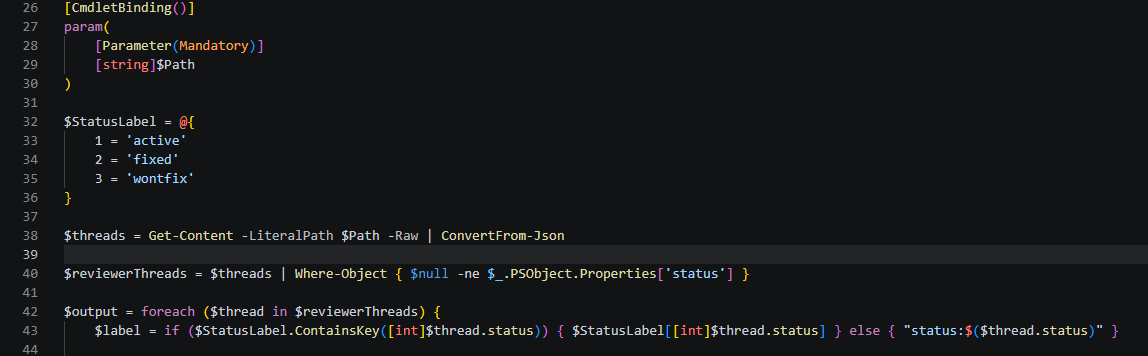
Take my pull request review skill. The Azure DevOps “List pull request threads” call returns roughly 90 KB of JSON for a single PR. Nearly half of that, 48 out of 100 threads, is TFS push-notification noise: threads with no reviewer status, auto-generated by Azure DevOps for every commit pushed to the branch. The agent has to wade through all of it to find the 52 actual reviewer comments it needs. As I wrote in my post on context engineering fundamentals, context degradation is a real risk. Filling the window with noise is a reliable way to trigger it.
So I replaced that raw MCP call with a PowerShell filter script. It strips the noise and reformats the real reviewer threads as compact plain text. The payload drops from roughly 90 KB to 17 KB, a 5.3x reduction, before anything reaches the model context. The agent calls one script, gets structured output, and gets to work.
When Copilot’s updated pricing model comes into effect next month, I will likely update my scripts to convert JSON to TOON (Token Optimized Output Notation) for even greater efficiency.
Where scripts shine
The expense overview skill is the clearest example of something that simply cannot be done without code. Writing structured data into an Excel template with correct formatting, formulas, and layout is too complex for any current agent to get right purely through tool reasoning. A Python script handles it cleanly every time. The agent gathers the receipts, extracts the relevant data, and hands it to the script. The script produces a correctly formatted file. No improvisation required.
The WSL development environment setup uses Bash. The Azure DevOps workflows use PowerShell. The choice of scripting language matters less than the principle: give the agent a reliable, testable interface to a complex operation rather than asking it to improvise.
The cost of control
Scripts do give up something: adaptability. An agent with access to raw tools can adjust when something unexpected happens. A script with a fixed interface cannot. This approach works best on workflows that are well-defined and repeatable. The expense overview, the PR comment filter, the environment setup. These tasks have a known shape, and for them predictability is more valuable than flexibility.
There is also the classic risk: “but it works on my machine.” Scripts have dependencies, environment assumptions, and sometimes hardcoded paths. However, I have found that using agentic development to maintain the scripts themselves largely solves this problem. Updating or improving a script takes a matter of seconds when you have an agent helping. The meta-skill, using agentic development to evolve your own skills, closes the loop surprisingly well.
Building the reliable layer
A clean separation of concerns emerges from this approach. Skills define the what and the when. Scripts define the how. Keeping those two concerns distinct is what makes agentic workflows scale beyond simple demos into automation you can actually trust.
As agents become more capable and the tasks we delegate to them carry more weight, building that reliable layer becomes more important, not less. The question is no longer whether agents can do complex work. It is whether you have built the scaffolding that makes it safe to let them.